Lead Response Best Practices for Home-Service Businesses
By David Cavill · November 25, 2026

The best practice is to get a human on every new call and form within minutes, using an instant alert to your phone so a job site doesn’t delay you. Then follow up on a fixed schedule until the lead books or replies.
SeenOnMain rings your phone and texts you the lead’s details the instant a call or web form comes in.
TL;DR
- Set an alert on every channel (form, business line, chat) so the owner or dispatcher knows within seconds, then call back while the customer is still looking.
- Measure your own response time every week: first contact minus first human reply, tracked as an average, a median and your slowest 10%.
- Follow up on a schedule instead of from memory. Our follow-up emails go out on Day 1, 3, 7 and 14 on Starter and above, and stop when the lead books or replies.
- Keep texting legal: marketing texts generally need prior express written consent, and an attorney should review your wording.
- Ask for reviews the compliant way, after the job and without incentives.
- ✓Instant call and form alerts
- ✓Lead details texted to your phone
- ✓Follow-up emails on days 1, 3, 7 and 14
Table of Contents
- Why response speed is a process problem, not a willpower problem
- Practice 1: Make every channel alert a person instantly
- Practice 2: Set a response target for each channel
- Practice 3: Make the first reply specific and short
- Practice 4: Use a missed-call text-back, but only where it fits
- Practice 5: Follow up on a schedule until the lead books or replies
- Practice 6: Let a chat assistant answer the easy questions
- Practice 7: Measure response time like a business metric
- Practice 8: Stay compliant with texts and reviews
- How to set up lead response in a week
- What each plan covers
- Try it on real leads
- Our perspective
- FAQ
- Sources
Why response speed is a process problem, not a willpower problem
Most home-service owners already know they should reply quickly. The trouble is that the people who take the calls are the people under a sink, on a roof or in an attic. Leads arrive exactly when nobody can pick up.
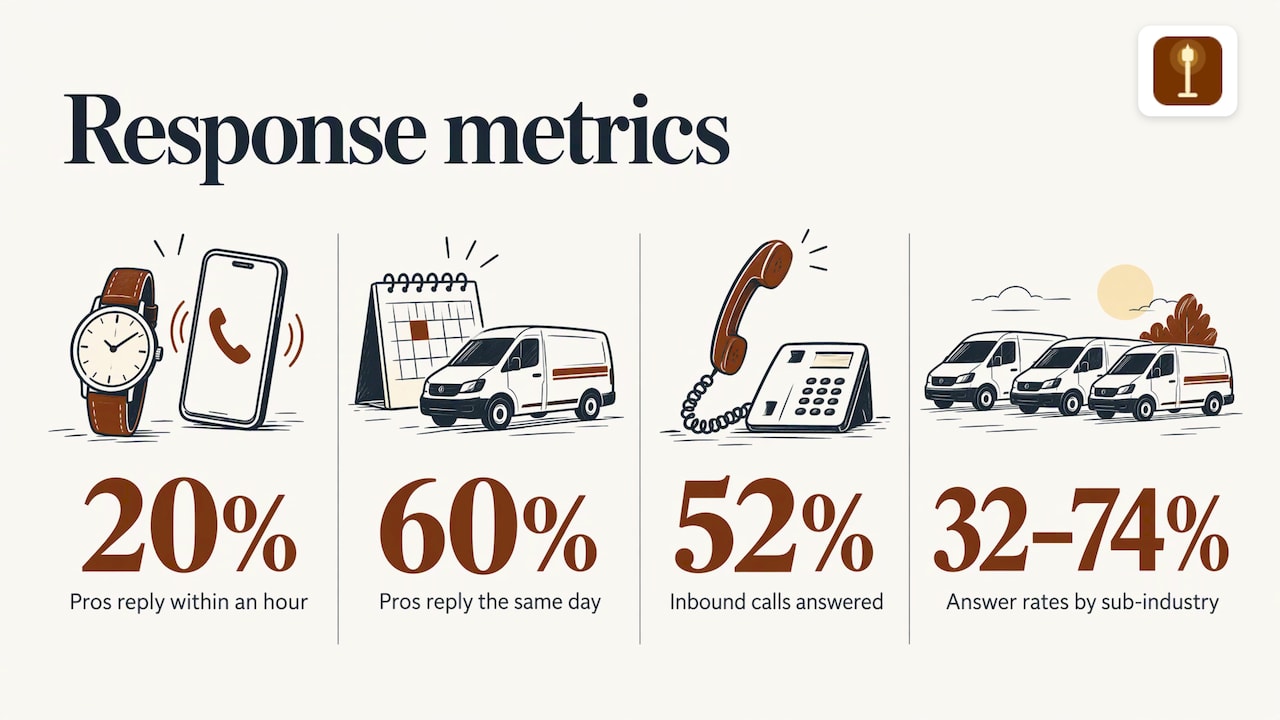
The numbers show the gap. In the Jobber 2026 Home Service Trends Report, 20% of service pros said they reply to new leads within the hour and 60% said the same day. A same-day reply is respectable, but a customer who filled in three forms over lunch may already have talked to someone by dinner.
Calls show a similar pattern. The Invoca 2026 Home Services Benchmarks report found that a person answered 52% of all inbound calls in its home-service data, and answer rates across sub-industries ranged from 32% to 74%. An unanswered call is not a lost job. It is a call that didn’t reach a person, and what you do in the next few minutes decides whether a conversation still happens.
The practical conclusion: build the response so it does not depend on anyone being free. Alerts, schedules and templates do the remembering. People do the talking.
Practice 1: Make every channel alert a person instantly
Start with a list of every way a customer can reach you: the website contact or quote form, the phone number printed on the truck, a business line on your Google profile, a chat box, a social message. Each one needs an owner and an alert.
The standard to aim for is simple. When a lead arrives, the responsible person’s phone rings or buzzes within seconds, with the name, number, service and message in front of them. A lead that sits in an inbox until Monday has already waited too long.
Here is what we built SeenOnMain to do. The second someone fills in your contact or quote form, or calls your dedicated toll-free business line, SeenOnMain rings your phone and texts you the lead’s details so you can call back while the customer is still looking. The owner or the person on lead duty gets the same alert, so nobody has to refresh a dashboard.
A few rules make the alert work:
- Pick one person on duty per day or per shift. A shared alert that goes to four people usually means nobody calls.
- Put the alert where you already look: your phone, not an email folder.
- Keep forms short. Name, phone, service needed and ZIP code give you enough to make a useful first call.
Your website matters here too. A page built to produce calls and complete forms gives you something worth responding to, and a lead generation website that turns visitors into calls is the front half of the same system.
Practice 2: Set a response target for each channel
A target you can hit beats a target you hope for. Write one down for every channel and judge yourself against it weekly.
| Channel | Reasonable target | What the first response is |
|---|---|---|
| Phone call, business hours | Answer live, or call back within minutes | A real conversation |
| Website quote form | Call back within minutes of the alert | A call, not a form letter |
| Chat on your site | Immediate answers to basic questions, handoff for quotes | Answers from your own info, then you |
| After-hours form or call | First thing next morning, before the day’s jobs start | A call or text with an apology for the delay |
These are our working targets, not laws of nature. What matters is that the target is specific, so a miss is visible. Our guide on how fast you should respond to a lead goes deeper on timing by channel, and the page on what happens if you don’t respond fast covers the cost of slow replies in plain terms.
Trade-specific notes
Emergency trades such as plumbing, HVAC and electrical get calls from people who need help now, so the alert and the callback matter most. Pest control and cleaning leads are often comparing options, so a fast call plus a clear follow-up sequence keeps your company in view. Roofers and landscapers deal with seasonal surges, when form volume can outrun the crew’s capacity to call back, and a written schedule matters most.
Practice 3: Make the first reply specific and short
When you reach the lead, whether by phone or message, the first contact has one job: show you read the request and move to one next step.
A solid first call or text covers:
- Their name and the specific job they asked about, such as a water heater that won’t hold temperature.
- A confirmation of the service address area (city or ZIP) so you both know you can serve it.
- One question that affects the work, such as the age of the unit or whether anyone is home.
- One clear next step: a time to talk, a photo to send, or a visit.
Avoid answering with a list of everything you do. Callers who asked about a leaking pipe want to hear about the leaking pipe.
Be careful about quoting before you know the job. Give a range only when you can stand behind it, and say what details move the price. The customer remembers the honest answer.
Practice 4: Use a missed-call text-back, but only where it fits
Some calls will still go unanswered, because you are mid-job. A text-back gives a caller a way to reach you in writing while the problem is fresh.
Our missed-call text-back works this way, and the details matter:
- The missed-call text-back is opt-in for the caller, not something that texts everyone.
- It works on your dedicated SeenOnMain business line, and a caller only gets a text if they press 1.
- You get one text back to that caller if you miss the call.
- It only works between 8am and 8pm.
- The missed-call text-back is available on Starter and above.
We do not text every caller or every lead. The press-1 step keeps the exchange wanted, which is also the safer footing for texting. Our comparison of which missed-call text-back approach fits lays out the options in more detail.
Practice 5: Follow up on a schedule until the lead books or replies
Most jobs are not booked on the first touch. A homeowner gets busy, asks a spouse, or waits for another quote. The businesses that win those jobs are rarely the ones with the cleverest message. They are the ones that kept showing up politely.
The Leadferno 2024 contact form study found that small businesses left a large share of website contacts without any reply, which is the clearest argument for a schedule that runs without effort. That is the gap a written cadence closes.
On Starter and above, SeenOnMain sends follow-up emails on Day 1, Day 3, Day 7 and Day 14 when a lead doesn’t book. The emails are written from your business’s own facts: your services, your service area and your hours. Each one links to your booking page, whether that is Jobber, Housecall Pro or Calendly, so a ready customer can pick a time in one click. The emails stop when the lead books or replies.
That connection is through your booking link only. SeenOnMain works alongside your existing scheduling tool and does not replace it, and the booking itself happens in your system.
A good sequence mixes value with the ask:
- Day 1: a short check-in that repeats the request and offers the booking link.
- Day 3: one useful fact about the service, such as what affects timing.
- Day 7: a reminder that your schedule fills up, with the booking link again.
- Day 14: a polite close that makes it easy to say yes or no.
If you want to go further on multi-step sequences, multi-channel email nurture sequences show how longer campaigns can reach leads who haven’t answered a single channel. Our own pages on lead follow-up cadence and how long a follow-up sequence should run explain why two weeks is a sensible window.
Practice 6: Let a chat assistant answer the easy questions
Visitors often have questions at 9pm that don’t need you: Do you serve my town? Are you licensed? Do you work weekends? A chat assistant on your mini website can answer those so the visitor doesn’t leave.
On Starter and above, the SeenOnMain AI chat assistant answers visitors 24/7 using only what you entered: services, service area, hours, pricing basics, licensing and FAQs. Anyone who wants a quote or a person is handed to you as a normal lead, with the alert described above. It never quotes a job, books an appointment, answers the phone or texts anyone. You can read more on the AI chat assistant page.
The quality of the answers comes from the quality of your input, so spend an hour filling in your FAQs honestly. Clear hours and a clear service area prevent most of the unwanted inquiries.
Practice 7: Measure response time like a business metric
What you don’t measure drifts. The formula is simple: lead response time equals the time of the lead’s first reply minus the time the lead first contacted you.
Track three numbers weekly:
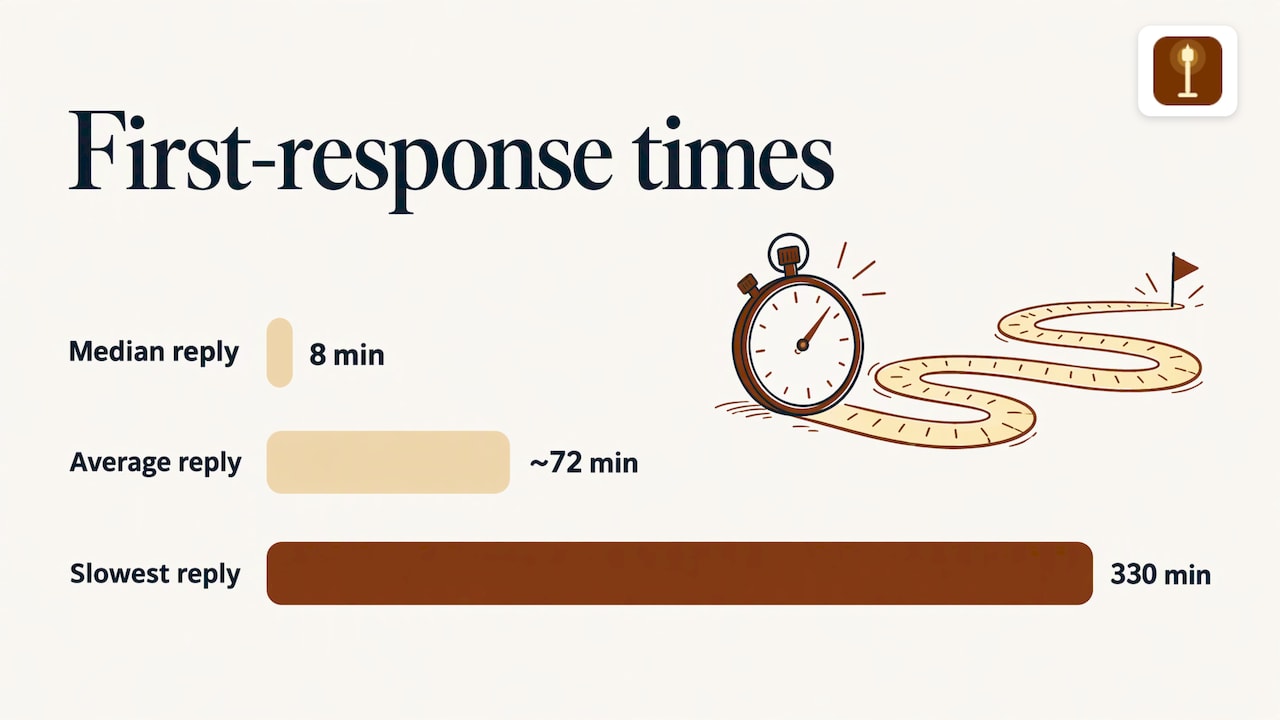
- Average, which shows the overall feel.
- Median, the typical lead’s experience, which is not distorted by a few extreme cases.
- Slowest 10%, which shows where the system breaks, such as weekend leads or after-hours forms.
Count a human attempt as the response. An automated receipt is useful, but a lead who gets only an auto-reply has not yet talked to anyone, so keep the two separate in your tally.
A worked example: five leads arrive in a week and your first replies come after 4, 6, 8, 12 and 330 minutes. The average is about 72 minutes, the median is 8 minutes, and the slowest one tells you the real story: something happened on that lead, perhaps a Saturday night form. Fix that one gap and your whole week improves.
Then compare the funnel. Count leads, how many you reached, how many got an estimate and how many booked. If reach is low, the problem is response. If reach is high and booking is low, the problem is the estimate or the follow-up. The free lead-response audit gives you a quick score of where you stand.
Practice 8: Stay compliant with texts and reviews
Texting is powerful and regulated. Marketing texts generally need prior express written consent, meaning the person agreed in writing to receive them. Recording that consent on your forms and honoring opt-outs is part of doing it well. Because rules vary by state and change, have an attorney review your wording before you launch any texting program.
Reviews follow their own rules. After a job, a Day 14 Google review request goes out from SeenOnMain once you mark a lead as a customer. SeenOnMain does not detect when a job is won, so the step is yours: mark the customer, and the request follows.
Keep your review asks clean:
- Google’s policy prohibits asking only happy customers for reviews and prohibits offering incentives for reviews.
- The FTC’s rule on fake reviews bars rewards tied to a rating and bars hiding negative reviews.
Ask every customer the same way. A fair ask builds a review profile that new leads trust.
How to set up lead response in a week
Setup does not need an IT person. A realistic one-week plan:
- Day 1: list every channel where leads arrive and name who is on duty for each.
- Day 2: put a form on your site and a business line on your listings, so every lead lands in one place.
- Day 3: turn on instant alerts to your phone and test them by submitting your own form.
- Day 4: write your hours, service area, licensing and FAQs for the chat assistant and the emails.
- Day 5: connect your booking link so follow-up emails send leads straight to your calendar.
- Day 6: decide whether to turn on the missed-call text-back and confirm your consent wording with an attorney.
- Day 7: record your baseline response time and pick the target for next week.
SeenOnMain handles the setup for you, with no technical work on your end. Our page on managed setup explains what that covers.
What each plan covers
| Plan | Price | What you get for lead response |
|---|---|---|
| Lite | $49 per month | Alerts only: no follow-up emails, no business line |
| Starter | $99 per month | Adds follow-up emails, the business line with opt-in text-back, and the AI chat assistant |
| Growth | $199 per month | Everything in Starter, at the next tier |
| Pro | See the pricing page | Top tier |
Pricing is flat, so a busy month doesn’t raise your bill.
Try it on real leads
If your response today depends on whoever happens to be free, SeenOnMain gives you the alert, the follow-up schedule and the chat assistant in one place, built only for home-service trades. It works alongside Jobber, Housecall Pro and ServiceTitan.
The trial is 14 days, with no credit card required, and it stays free until a real lead comes through, up to 90 days. Plans start at $49 a month, and you can compare them on the pricing page.

To see how it fits your trade, look at our pages for electricians, pest control and roofers.
Our perspective
We built SeenOnMain after watching the same pattern in small trade businesses: the owner is the best person to call the lead back, and the owner is the person least able to answer the phone.
Our answer is not to put a machine in the owner’s place. No AI answers the phone at SeenOnMain. We ring your phone the second a form or call comes in, hand you the lead’s details, and let you do what only you can do: talk to the customer.
Where you can’t call right away, the follow-up emails carry on for 14 days from your own facts, and the chat assistant answers visitors’ questions from your own information only. Every path ends in you, with a booking link when the customer is ready.
Good lead response is not complicated. It is a short list of habits done every time. We just make sure the habits happen on the days you are busiest.
David
FAQ
What is a typical best practice when responding to a lead?
Get a person to contact the lead within minutes, using an instant alert so you know the moment the lead arrives. Reference the specific job, ask one useful question, and propose one next step. If the lead doesn’t book, follow up on a set schedule until they book or reply.
Does SeenOnMain answer calls or book jobs?
No. SeenOnMain rings your phone and texts you the lead’s details so you can call back. Follow-up emails link to your own booking page, such as Jobber, Housecall Pro or Calendly, and the booking happens there.
What is the formula for lead response time?
Lead response time is the time of the first human reply minus the time of the lead’s first contact. Track the average, the median and your slowest 10% each week. The slowest 10% shows where your process breaks.
Can I text leads automatically?
On Starter and above, the opt-in missed-call text-back sends one text to a caller on your business line who presses 1 and whose call you missed, between 8am and 8pm. For any other marketing text, you generally need prior express written consent, and an attorney should review your wording.
Sources
- 2026 Home Service Trends Report, Jobber
- The Invoca Home Services Lead Conversion Benchmarks Report 2026
- FTC announcement of the final rule banning fake reviews and testimonials
Recommended
Stop losing leads while you're on a job
SeenOnMain rings your phone the second a new lead comes in, so you can call back while they're still deciding.
Try the live demo